Example usage#
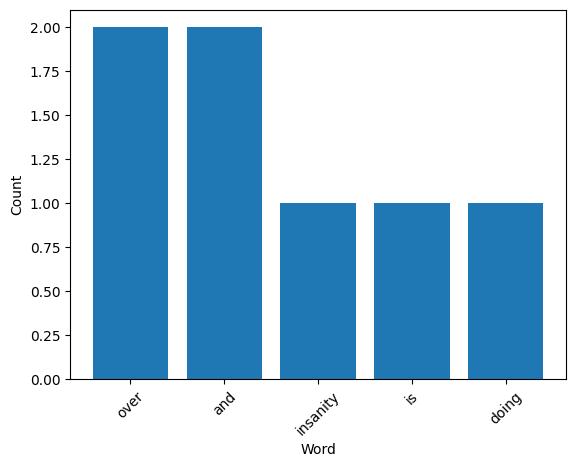
Here we will demonstrate how to use pycounts_radifar to count the words in a text file and plot the top 5 results.
Imports#
from pycounts_radifar.pycounts_radifar import count_words
from pycounts_radifar.plotting import plot_words
---------------------------------------------------------------------------
ModuleNotFoundError                       Traceback (most recent call last)
Cell In[1], line 1
----> 1 from pycounts_radifar.pycounts_radifar import count_words
      2 from pycounts_radifar.plotting import plot_words

ModuleNotFoundError: No module named 'pycounts_radifar'
Create a text file#
We’ll first create a text file to work with using a famous quote from Einstein:
quote = "Insanity is doing the same thing over and over and expecting different results."
with open("einstein.txt", "w") as file:
        file.write(quote)
Count words#
We can count the words in our text file using the `count_words() function. Note that this function removes punctuation and makes all words lowercase before counting.
counts = count_words("einstein.txt")
print(counts)
Counter({'over': 2, 'and': 2, 'insanity': 1, 'is': 1, 'doing': 1, 'the': 1, 'same': 1, 'thing': 1, 'expecting': 1, 'different': 1, 'results': 1})
Plot words#
We can now plot the result using the plot_words() function:
fig = plot_words(counts, n=5)